Notifications
In-App Notifications
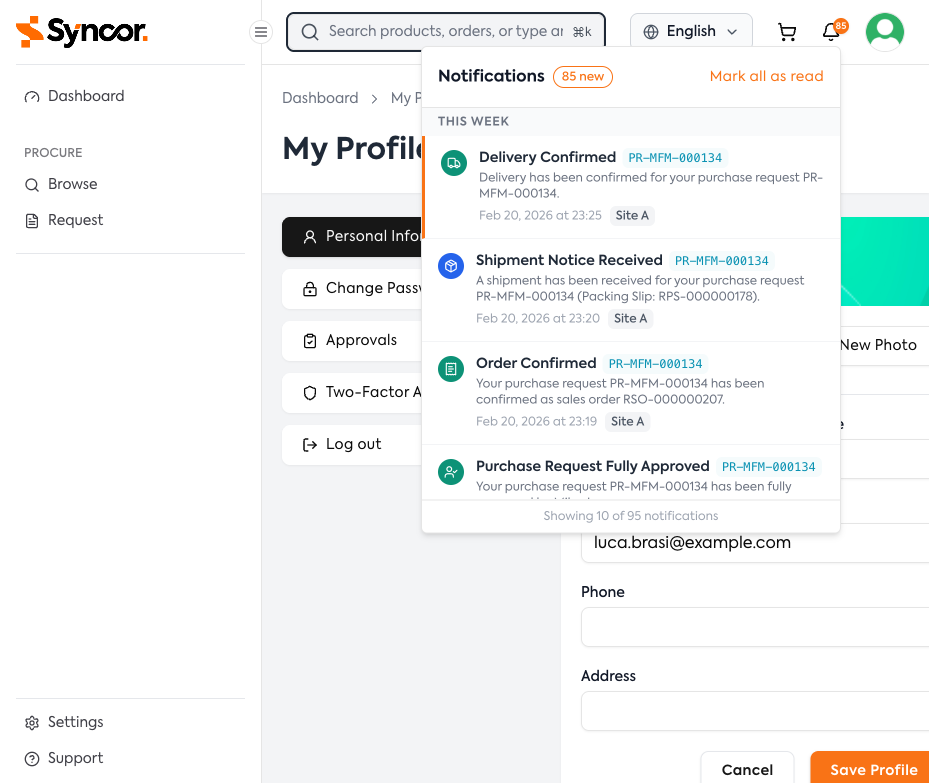
The notification bell in the top bar shows your unread count (displays "99+" if over 99).
Notification Dropdown
Click the bell to open the dropdown:
- Header — Unread count and "Mark all as read" button
- Notification list — Grouped by Today, This Week, and Older
- Load More — Click to load additional notifications
Individual Notifications
Each notification shows:
- Colored icon (event type indicator)
- Title (e.g., "Delivery Confirmed")
- PR Number badge (links to the related request)
- Message with additional detail
- Timestamp
- Site badge
Unread notifications have a blue left border. Click any notification to mark it as read and navigate to the related page.
Real-Time Updates
Notifications are delivered in real-time via WebSocket — new notifications appear automatically without refreshing.
Notification Types & Emails
| Event | Recipients | Description |
|---|---|---|
| Purchase Request Submitted | Approvers | A new PR needs your review |
| Purchase Request Approved | Requester | Your PR has been approved at a level |
| Purchase Request Fully Approved | Requester | All approval levels completed |
| Purchase Request Rejected | Requester | Your PR was rejected (includes reason) |
| Order Confirmed | Requester | PR converted to a sales order |
| Shipment Notice Received | Requester | Items from your PR have been shipped |
| Shipment Corrected | Requester | A correction was made to a shipment |
| Delivery Confirmed | Requester | Items have been delivered |
| Invoice Received | Requester | An invoice has been received |
| Payment Received | Requester | Payment has been processed |
| External Approver Requested | External approver | Review link email sent |
| External Approver Approved | Requester | External approver approved |
| External Approver Rejected | Requester | External approver rejected |
| External Approver Expired | Requester | External approver's link has expired |
note
Email notifications are sent in addition to in-app notifications for critical events. Your administrator may configure which events trigger emails.