Your Dashboard
The Dashboard is the first page you see after logging in. It provides a personalized overview of your procurement activity.
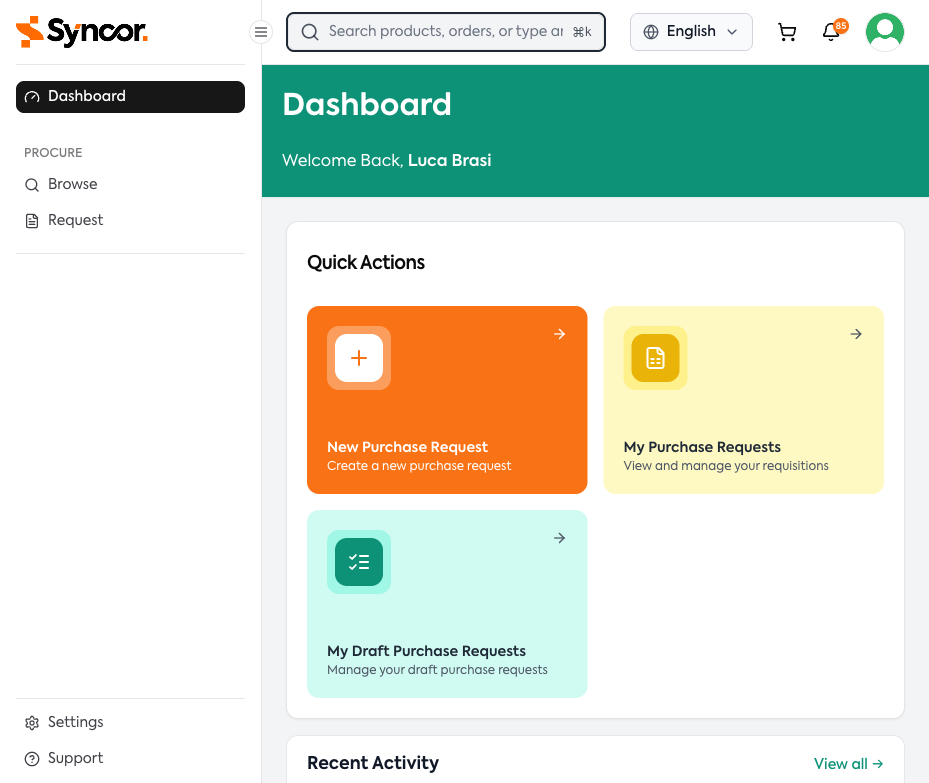
The dashboard is widget-based — different widgets appear depending on your role:
- Quick Actions — Shortcut cards for common tasks
- Approval Metrics — Statistics for approvers
- Pending Requests — PRs awaiting approval (approvers only)
- Recent Activity — Timeline of recent procurement events
- Help and Resources — Links to support resources
If no widgets are configured for your account, you'll see a "Widgets not available" message. Contact your administrator.
Quick Actions
For Requesters:
- New Purchase Request — Start creating a new purchase request
- My Purchase Requests — View and manage your requisitions
- My Draft Purchase Requests — Continue working on saved drafts
- Sourcing Requests — Create or view sourcing requests
For Approvers:
- Pending Requests — Jump to PRs awaiting your approval (shows count)
- Approval History — View your past approval actions
Approval Metrics (Approvers)
| Metric | Color | Description |
|---|---|---|
| Pending Approvals | Yellow | PRs waiting for your approval |
| Approved | Green | PRs you've approved |
| Rejected | Red | PRs you've rejected |
| Total | Brand color | Total PRs through your queue |
Filter by time period: All Time, Today, Week, or Month.
Pending Requests (Approvers)
Shows up to 5 pending requisitions in a compact table with quick-action controls. Click "View All" to navigate to the full Approvals page.
Recent Activity & Support
Recent Activity
A chronological feed of procurement events: submissions, approvals, rejections, order confirmations, shipments, and deliveries. Click any item to navigate to that requisition's detail page.
If a request has been rejected, you'll see a "Revise & Resubmit" link on the activity item.
Help and Resources
| Resource | Description |
|---|---|
| User Guide | Complete documentation |
| Video Tutorials | Step-by-step video guides |
| Support Chat | Chat with the support team |
| Contact Support | Call or email support |
These links are configured by your organization's administrator.