Navigating the Interface
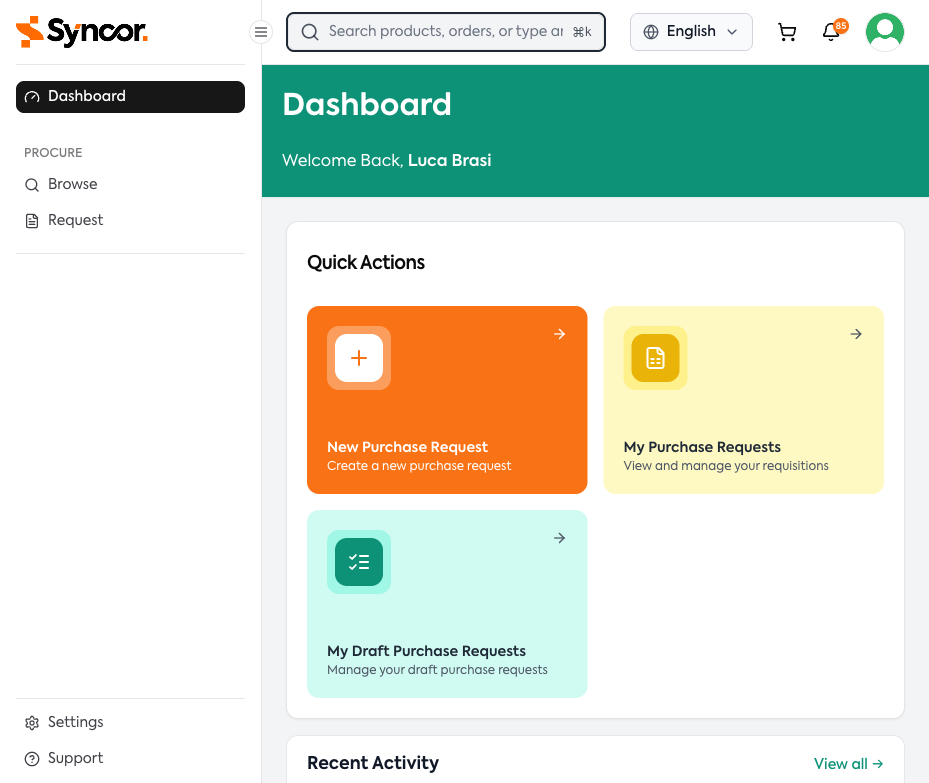
Sidebar Navigation
The left sidebar is your primary navigation:
- Dashboard -- Your home page with quick actions and activity feed
- Browse -- The product catalog
- Request -- Your purchase requests
- Approve -- Approval queue (approvers only)
- Order Lists -- Your saved product lists for quick reordering (only visible when enabled for your organization)
- Source -- Sourcing requests
- Settings and Support at the bottom
Collapse the sidebar to icons by clicking the Toggle Sidebar (hamburger) button at the top. Your preference is remembered across sessions.
Top Bar
From left to right:
| Element | Description |
|---|---|
| Search Bar | Search for products, orders, or actions. Shortcut: Cmd+K (Mac) / Ctrl+K (Windows) |
| Language Selector | Switch between available languages |
| Cart Icon | Shows items in your current draft. Displays item count badge. |
| Notifications Bell | Shows unread count ("99+" if over 99). Click to open the dropdown. |
| Profile Avatar | Click for your name, My Profile link, and Logout |
tip
The cart icon only appears if you have permission to create purchase requests and have an active draft.