Order Lists Overview
Order Lists let you save groups of frequently ordered products so you can quickly reorder them. Think of them as reusable shopping lists -- instead of searching for the same products every time, you build a list once and convert it to a Purchase Request whenever you need to reorder.
Why Use Order Lists?
- Save time -- No need to search for and add the same products repeatedly
- Stay consistent -- Keep standard quantities and product selections for regular orders
- Set reminders -- Get notified when it's time to reorder
- One-click reorder -- Convert any list to a draft Purchase Request instantly
How Order Lists Work
- Create a list -- Give it a name and assign it to a site
- Add products -- Browse the catalog and add products with quantities
- Set a reminder (optional) -- Choose a frequency so you don't forget to reorder
- Convert to PR -- When it's time to order, click Create Draft PR to generate a Purchase Request with all the products from your list
info
Order Lists are personal to your account. Only you can see and manage your own lists.
Accessing Order Lists
Click Order Lists in the sidebar navigation. This option is only visible if Order Lists are enabled for your organization.
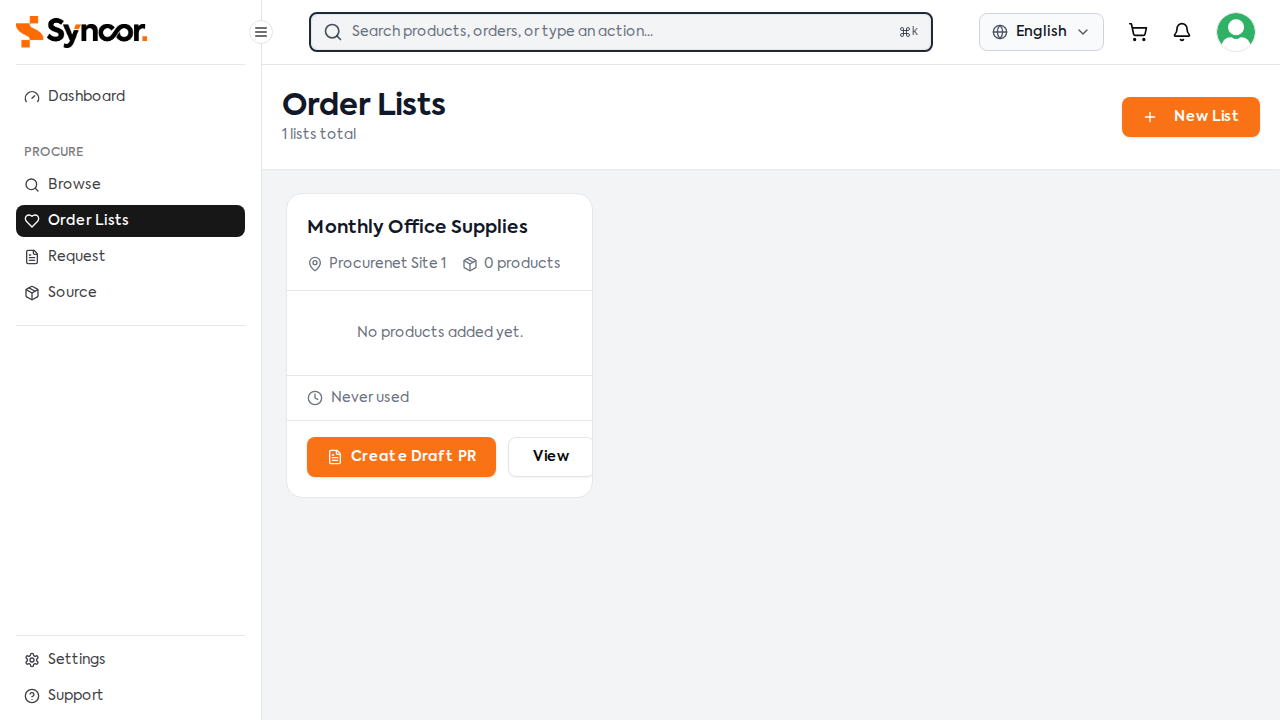
The index page shows all your Order Lists as cards, each displaying:
- List name
- Assigned site
- Number of products
- Product previews (up to 3 items shown)
- Last used date
- Reminder status and next order date (if a reminder is set)
- Quick actions: Create Draft PR and View
tip
If a reminder is overdue or approaching, a warning banner appears on the card to alert you.